

Declaring variables is one of the first things we learn when starting with a programming language, and this is no different in JavaScript. In the past, we used the keyword var to declare all variables in our code. This changed in 2015 when the landmark ES2015 (ES6) version was released, changing a large part of the JavaScript language.
With this version, two new identifiers for variables were introduced: let and const. And now that we have three declaration options for each variable, we may not know exactly which one to use in each case.
For that reason, in this article, we will explain the definition of each of them to facilitate the choice among the three. Let's go!
var - The oldest way
Declaring a variable with var is quite simple. We can see an example below:
var company = 'Hcode Training';

console.log('My company is called ' + company);
Note that we defined a value for the variable and declared that its value should be displayed in the console. When executing this code, we see the following result:

The code worked correctly.
However, the big peculiarity of a var variable is the scope of its operation, meaning the limit of where it will be “seen.” All variables created outside functions or other code blocks have a global scope.
But a variable declared with var has what we call a function scope. This means that if we create a variable of this type inside a function, its reference may be identified and modified anywhere in that function, even if we create other scopes within it, such as an if(), switch(), or for(). This can lead to some problems. Let's see an example of this.
Let's create a function that will return the names of two car manufacturers. The code will be as follows:
function returnCar() {

    var car = 'Land Rover';

    if (car === 'Land Rover') {

        var car = 'Ferrari';

        console.log('Inside the if: ' + car);

    }

    console.log('Outside the if: ' + car);

}

returnCar();
Note that we redefined the variable car inside the if(), which is a new scope. Will it interfere with the main scope of the function? Let's see. The result of this code will be as follows:
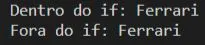
Note that “Ferrari” was returned in both cases, both inside and outside of the if(). In other words, the variable created within the if() overwrote the variable of the function, even though they were from different code blocks.
However, don't you agree that we often declare a variable in a code block for a specific purpose? So, after achieving what we want, it can be disregarded.
Especially since the example above represents a small function. But imagine that our project were large and that this overwriting occurred. It would take a long time to discover the problem.
To solve this issue, we can use let.
let - Taking into account the scope of each code block
A variable declared with let takes into account, not the function where it was created, but the code block of its origin. This means that if we declare it inside an if(), switch(), or for(), it will only be “seen” within that part of the code, within that specific scope.
Let's see what the code of the returnCar() function would look like with let:
function returnCar() {

    let car = 'Land Rover';

    if (car === 'Land Rover') {

        let car = 'Ferrari';

        console.log('Inside the if: ' + car);

    }

    console.log('Outside the if: ' + car);

}
Now, when we call this function, we will see the following result:
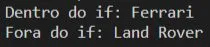
Note that now the string “Ferrari” was only identified inside the if(). Outside it, the string “Land Rover” continued to be identified, which was what we expected.
This way, we can see that using let helps us avoid confusion in the code regarding the scope of execution.
Let's see one more example about this difference with another resource we use a lot: loops.
Imagine that we want to create a for() that will display the years of the 2000s. However, we will also define a console.log() outside this loop to check the final index, as follows:
for (var i = 2000; i <= 2010; i++) {

    console.log(i);

}

console.log('Index outside the loop: ' + i);
When we execute this code, we will see the following result:
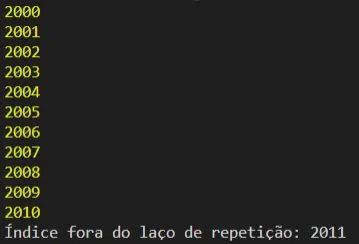
The years were correctly displayed, but the index was recognized outside of the for(), with the value “2011”. But, as we have already said, this doesn't make much sense.
Let's test the same code, but now with let:
for (let i = 2000; i <= 2010; i++) {

    console.log(i);

}

console.log('Index outside the loop: ' + i);
The years will be displayed the same way, but the last console will return the following error:

The error indicates that the variable i was not identified. This happened because this variable is only recognized within the for(), which is precisely our goal. This also helps to keep our code lighter.
Taking all of this into account, it is recommended that we always choose to use let instead of var.
Hoisting - How it is applied in var and let
Another difference between var and let is the Hoisting process. This process occurs in all variables in JavaScript. This expression means “to hoist” or “to elevate.” Thus, all variables declared in JavaScript are elevated to the beginning of our code when it is executed.
This allows us to do something quite interesting. For example, see the code below:
number = 2;

var number;

console.log('The number is ' + number);
Note that we manipulated the value of the variable number before declaring it. In your opinion, will this code work? Let's see the result displayed in the console:
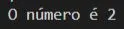
The code worked correctly, because “under the hood,” the variable number was “hoisted” to the beginning of the code when it was executed.
Now, let's do the same with let:
number = 3;

let number;

console.log(number);
Will it work the same way? In this case, we see the following result:

Our code didn't work. The variable number underwent hoisting just like before. However, because it was declared with let, it was not initialized, as happens with var.
Thus, if we want to manipulate the value of a let variable, we must declare it first.
This is another difference between var and let.
const - Creating constant variables
Our last way to declare a variable is through const, used to define a constant. Perhaps we might think: “But how is it possible to use a variable declaration to create a constant?”
This may seem nonsensical. However, declaring a variable as const does not necessarily mean that its value cannot be changed. It means that we cannot overwrite its identifier. Let's understand this better.
Let's create a constant that will contain the value of our site's IP:
const IP = '127.0.0.1';

console.log(IP);
When we execute the code above, we will see the following result:
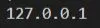
The value of the constant was correctly returned.
However, let's try to redefine its value. We will use the following code for that:
const IP = '127.0.0.1';

IP = '192.168.0.1';

console.log(IP);
If we try to execute this code, we will see the following result:

Note that now an error was returned, informing us that we cannot redefine the value of a constant variable. This is indeed what we expect from a constant.
But, if our constant is an object or an array, we can change its properties. Let's see an example.
Let's create a constant that will contain the values of administrative access:
const USER_ADMIN = {
    name: 'Ronaldo Braz',
    login: 'root'
};
Let's change the value of the property login, with the code below:
USER_ADMIN.login = 'admin';
When executing console.log(USER_ADMIN), we will see the following result:

Now the code worked normally and the login property was changed. This is a caveat about constant variables in JavaScript.
Another interesting rule about constants is that we must necessarily define a value for them when declaring, unlike what happens with var and let. Imagine that we simply provided the identifier of a constant, as in the code below:
const SITE;
If we execute the code, we will see the following error:

Note that the error indicates that we did not define a value for the constant in its declaration.
Conclusion
In this article we learned the difference between var, let, and const. We hope this knowledge can help you when you need to choose between these three variable declarations.
Remembering that we talked about variables and many other concepts of JavaScript in our Complete JavaScript Course and also in Hcode Lab, our Developer Training Program.
Thank you for reading this far and see you in the next article :)