

When we study programming, we learn over time that one of the most important things in our code is not just that it is working, but that it is well organized. One way to achieve this organization is by breaking a main file into smaller files, thus fragmenting our code. And after performing this division, we need to introduce the content of these other files into our page if we want to access their resources. For this, we use the concept of file importation. In PHP, we can perform this import through include and require. We will talk about each of them in this article.
include
The include imports a file into our page and checks if that file is working and if it actually exists. If this check finds any problem in the file, a warning will be returned on the screen, but the code below the include will continue to be executed.
In addition, include has some built-in features. It has access to the include_path, which is a directory on our server, configured in the php.ini file, that contains some inclusion files. Thus, when performing the include, if the desired file does not exist in the specified path, PHP also checks if it exists in the include_path. If it does not exist in either, the warning is returned to us.
Also, with include we have access to another feature: we can import files that are on other servers, in other domains. If we want to use this feature, we need to be cautious, as bringing the content of files from other domains to our page can be dangerous. After all, these files may contain malicious code. Therefore, be very careful with this type of importation.
Below we see an example of using an include:
<?php

include "user.php";
An interesting detail is that we can use include and require with parentheses if we wish. However, they are not functions. The PHP documentation defines them as statements. Nevertheless, we can use parentheses if we desire, as seen below:
<?php

include("user.php");
require
The require imports a file into our page and checks if that file is working and if it actually exists. However, it does this with a small difference. If any problem is found in the file we are importing, require returns a fatal error, which will stop the execution of our code, unlike include. Thus, we can say that require mandates that the imported file must be working for our application not to “break”.
Below we see an example of using require:
<?php

require "hcode.php";
And just like include, we can also use require with parentheses if we wish:
<?php

require("hcode.php");
To better understand the difference between include and require, let’s create a practical example.
Practical Example
We will create a file called file.php, which will be imported later. It will display a successful import message through an echo. Its script will be as follows:
<?php

echo "Import ok";
Now let's create an index.php file. It will import the file.php file and then display another message. The two files will be in the same directory. We will use include first. The content of the file will be as follows:
<?php

include "file.php";

echo "
";

echo "Hcode Trainings";
If we access this file in our browser, we will see the following result:

The code worked without any issues. Now let's provoke an error. We will try to include the file file1.php, which does not exist:
include "file1.php";
If we refresh the browser, this will be the result:
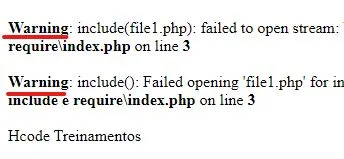
A warning was returned to us, indicating that the file does not exist. However, notice that the string “Hcode Trainings” was displayed normally, which shows that the execution of our code continued.
Now let’s replace include with require, and we will provoke the same error. The code will look like this:
require "file1.php";
After this change, let's refresh the browser. And now we will see the following:
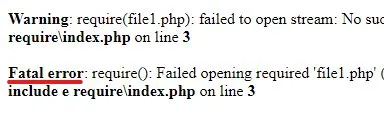
Note that now a “Fatal error” was returned. Additionally, the string “Hcode Trainings” was not displayed, which shows that the execution of our code was canceled due to this problem. Thus, we can practically see the difference between include and require. By analyzing each situation, we can decide when to use one or the other.
include_once and require_once
Another important point about include and require is that both have a declaration with the suffix “_once”. The word “once” basically means “one time”. When we use this suffix, we ensure that the desired file will be imported only once in our application. This is very interesting because it may be that, without realizing it, we accidentally import the same file twice. This can generate an error message in the browser, or it may cause the script of the imported file to execute twice, which can create problems. By using include_once or require_once, we eliminate the chance of that happening. Thus, if you can choose, prefer to use these declarations with the suffix “_once”.
Conclusion
Importing files is one of the actions we perform the most in our projects. And the more our projects grow, the more importations become necessary. It’s good to know that PHP offers us powerful resources for this, and in this article, we saw what these resources are and the differences between them. Remembering that you can learn much more about PHP resources in our Complete PHP 7 Course. We hope you enjoyed this content and thank you for reading this far.
Until the next article :)