
Hcode
AI for Developers

Automations with n8n

3 - 6 Hours 4 Modules

Overview

Main Theme: AI for Developers

Workload: 3 - 6 Hours

Level: Intermediate

Target Audience: Developers, Data Engineers, and Operations Analysts

ABOUT THE TRAINING

For developers, n8n is the tool that combines the speed of "No-Code" with the flexibility of pure code. This training teaches how to replace complex manual scripts with powerful visual flows while maintaining the freedom to inject JavaScript or Python whenever necessary. The focus is on creating a professional automation infrastructure that connects APIs, databases, and AI models with rapid implementation and ease of maintenance.

Objective

Empower professionals to build robust data pipelines and backend agents that perform tasks autonomously, ensuring system resilience through advanced error handling and real-time monitoring.

TRAINING MODULES

Module 01

AI Pipelines and Data Orchestration

Building end-to-end flows. Learning how to receive data via Webhooks, process information using language models, format output in JSON, and persist results in databases, all in a visual and structured manner.

Module 02

Backend Agents and Native Tools

Using the new n8n Agent nodes to create functional assistants on the server. The students will learn to set up "tools" for the agent, allowing it to execute logical tasks and make decisions based on external data natively.
Module 03

Resilience, Retries, and Error Handling

Configuring fail-proof automations. How to implement wait nodes to avoid rate limits, set up automatic retries, and create alert flows to notify the team instantly if a critical step fails.

Module 04

Practical Lab: Lead Generation and Scraping System

Implementation exercise of a complete pipeline: the challenge consists of creating a system that extracts data, scrapes websites to find emails using Regex, filters duplicates, and exports the final organized list to Google Sheets automatically.

A workflow example in n8n

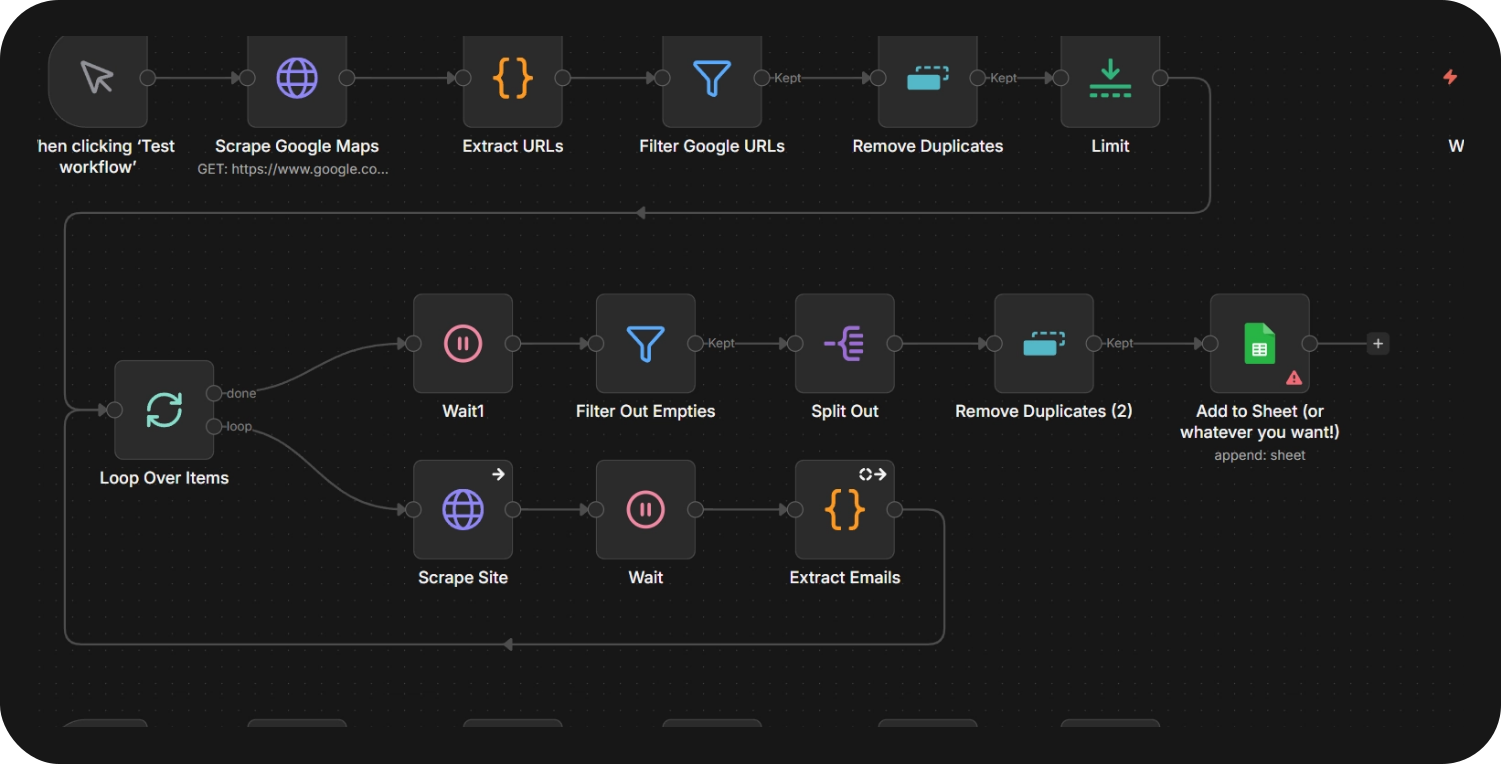
Lead generation system - Google Maps data extractor to email, with export to Google Sheets.

This workflow builds a completely free email extraction system from Google Maps, able to collect an unlimited number of business emails without expensive third-party APIs. Built entirely in n8n, using simple HTTP requests and JavaScript, it can generate thousands of qualified leads for any sector or location, running on a cost structure that is 99% free.

STEP 1: Extracting data from Google Maps
  • Process: Uses HTTP requests to search Google Maps with queries such as "dentists in São Paulo".
  • Output: Raw HTML containing business listings and website URLs.
  • Key point: No APIs required — extraction straight from the HTML.

Note: Replace the search URL with your target location and the type of business you want.

STEP 2: Processing website URLs
  • Extract URLs: A JavaScript regex finds every website URL in the Google Maps data.
  • Filter out Google URLs: Removes irrelevant domains (google.com, gstatic, and so on).
  • Remove duplicates: Drops repeated sites.
  • Limit: Controls the batch size for testing (adjust it for production).

Result: A clean list of real company websites, ready for email extraction.

STEP 3: Smart website scraping
  • Loop over items: Processes the sites one by one, with built-in delays.
  • Fetch site: Downloads the HTML content of each company website found.
  • Wait nodes: Avoid rate limiting and IP address blocking.
  • Error handling: Keeps the processing going even when some sites fail.

Critical: Batching and delays are essential for reliable operation at scale.

STEP 4: Email extraction and export
  • Extract emails: A JavaScript regex finds every email address in the site HTML.
  • Filter empties: Removes sites where no email was found.
  • Split: Turns email lists into individual items.
  • Remove duplicates: Final deduplication across all sources.
  • Append to sheet: Exports the clean email list to Google Sheets.

Result: An organized database of business emails ready for outreach.
Get in touch with our specialists

The names GPT-5 (OpenAI), Claude (Anthropic), and Gemini (Google) are mentioned only for informational and comparative purposes.